
Topicus KeyHub 49 is a release you will mostly notice by looking at it: a large sweep through the administration console has rebuilt the overview and management screens on a single, consistent table layout. Beyond the new look, this version makes synchronisation with identity sources far more transparent, extends AWS SCIM provisioning with cursor-based pagination and better group handling, lets you switch individual client applications off without deleting them, and tightens security across authentication, cryptography and the appliance itself.
Important notices
Brief downtime during cluster upgrades
TKH-3793 Upgrading a clustered installation to version 49 introduces a short interruption of about 30 seconds. During the upgrade a new watchdog authentication key is rolled out to all database nodes at the same time, which briefly restarts the connection pool across the cluster.
Notifications about retired cryptographic algorithms
TKH-3852 Topicus KeyHub has retired a number of older cryptographic algorithms. After upgrading, installations that still hold signatures created with a retired algorithm will show a notification on the dashboard listing the affected groups, accounts and OAuth2 clients, together with the version in which the algorithm was retired (49). Groups and accounts can repair their own signatures, and the administrator of an affected client can clear the warning by rotating the client secret. If you see such a notification, review the audit log to identify and repair the affected entities. Consult the manual for more information.
Redesigned overview and administration screens
A large part of this release went into modernising the administration console. Many of the overview and management screens have been rebuilt on a single table component with consistent search, filtering and sortable columns, so the same controls work the same way wherever you are.
-
TKH-3677TKH-3827TKH-3828TKH-3831TKH-3834TKH-3838TKH-3842TKH-3847TKH-3848The same redesign was rolled out across many screens: the groups, account directories, directory accounts, applications, provisioned systems, webhooks and bulk account edit overviews, together with the certificates, provision number sequences, vault recovery and per-organisational-unit client application screens, and the remaining data panels throughout the console. -
TKH-3829Operational status is now shown across the directories, systems, applications and webhooks overviews with colour-coded online, degraded, offline and disabled indicators and a tooltip explaining the current state. -
TKH-3837The service account screens have been redesigned, and the separate groups page has been folded into the service account details page, so everything about an account sits in one place.
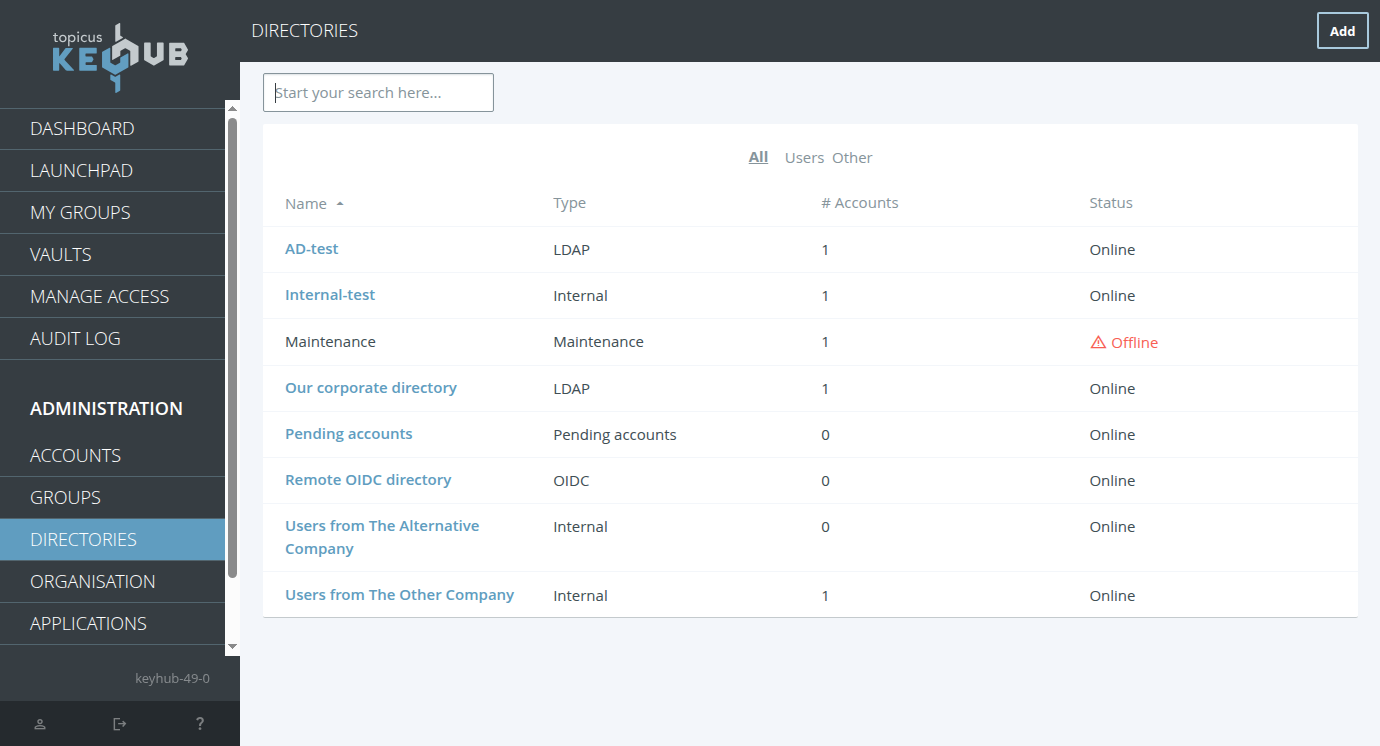
Redesigned account directories overview
Identity source synchronisation and provisioning
The connections to identity sources and provisioned systems received a lot of attention this release, from clearer insight into what synchronisation is doing to new provisioning options and a series of fixes.
-
TKH-3382Account matching for Azure source directories is now configurable. Alongside the three built-in matching strategies, you can designate one additional attribute from the Azure tenant to match against existing KeyHub accounts, which helps when the standard identifiers are not enough on their own. -
TKH-3765Synchronisation logs are now shown directly on the identity source, including AFAS. Each run records when it happened, how many records were processed and any warnings or errors, giving a clear trail when you need to work out why incoming data looks the way it does. -
TKH-3769For SCIM provisioning on AWS, group memberships are now retrieved using the standardmembers.valuefilter, and the earlier workaround for AWS IAM Identity Center has been removed. -
TKH-3770SCIM provisioning now supports RFC 9865 cursor-based pagination in addition to the existing index-based mode. Cursor-based pagination is enabled by default for AWS IAM Identity Center, which walks through large result sets using opaque cursors rather than numeric offsets. -
TKH-3788Failure to write the user's directory password after updating the password on linked systems now marks the password on these linked systems as invalid, helping the user to correct the situation. -
TKH-3795Provisioning to Azure no longer fails with an error when an account has no email address. -
TKH-3806Logging in no longer fails when a directory account holds a malformed phone number or email address. Such values are now recorded as invalid instead of stopping the synchronisation. -
TKH-3833Reading an incorrectly formatted attribute during synchronisation no longer triggers an error. The value is flagged as out of sync and corrected automatically once a valid value arrives. -
TKH-3843Several problems with account activation through an Entra ID source directory have been resolved. Failures to remove an account are now recorded as errors rather than being hidden, which makes provisioning problems far easier to spot. -
TKH-3874Provisioning groups to Microsoft Entra ID no longer fails for users who are a direct member of an administrative unit. Such units are correctly skipped, as their membership is not managed by KeyHub.
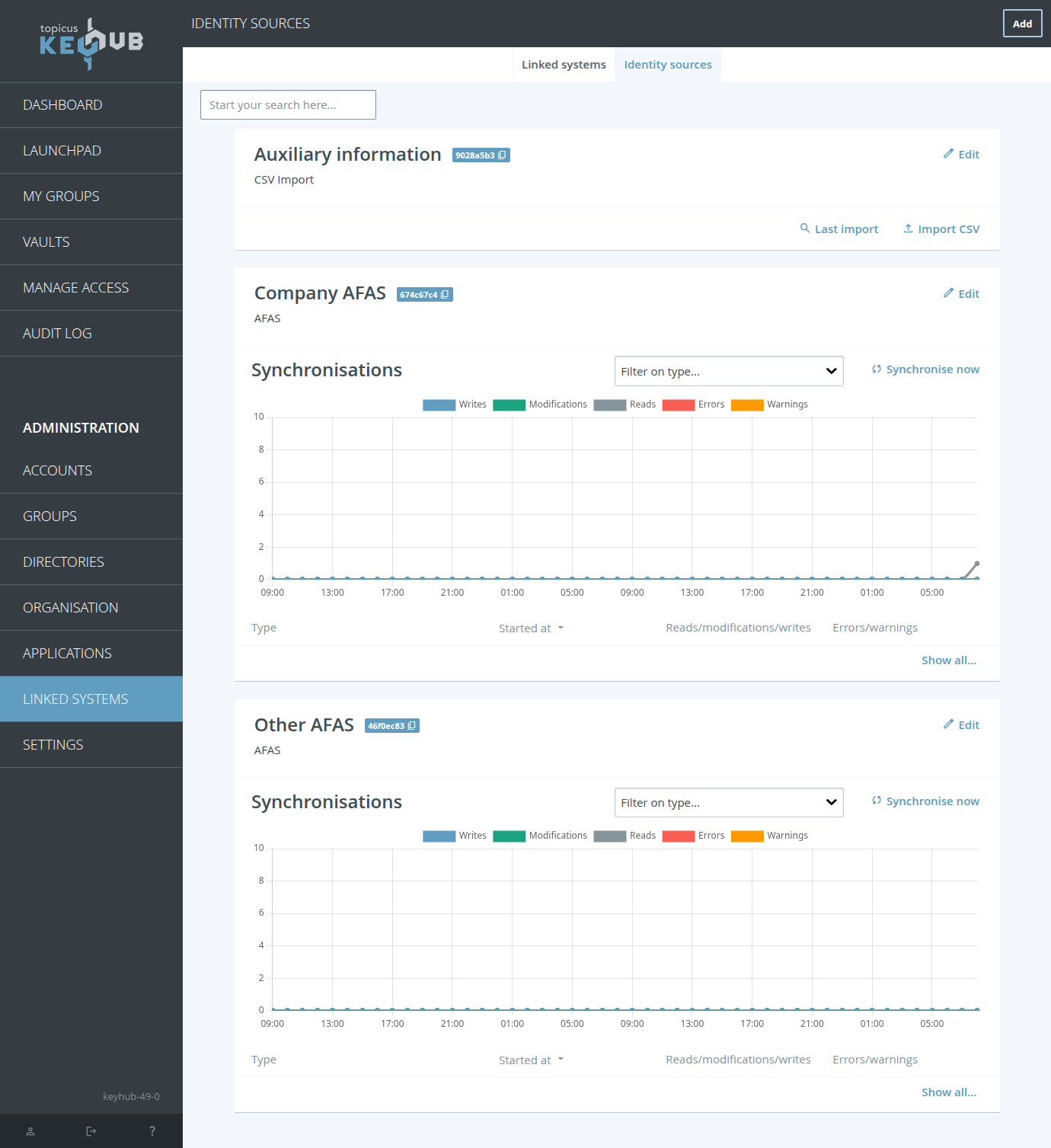
Synchronisation logs on an identity sources
Disabling client applications
TKH-3779 Client applications can now be individually disabled without deleting them. This lets you temporarily block access through a specific OAuth2, SAML 2.0 or LDAP application while keeping its configuration intact, ready to switch back on later.
Disabling an OAuth2 client immediately revokes any tokens and authorisation codes it has already issued, and a disabled application is rejected at every entry point, from the token and authorisation endpoints to the LDAP bind. The built-in Command-Line Interface and Browser Extension can also be disabled.
Security and cryptography
This release brings a number of security improvements across authentication, cryptography and the appliance.
-
TKH-2161Theamrandacrclaims in OpenID Connect tokens now reflect every authentication method completed during a session, not just the most recent one. Applications that rely on these claims get an accurate picture of how strongly a user authenticated. -
TKH-3702Syslog forwarding over TLS can now validate the receiving server far more strictly. Subject Alternative Name validation guards against certificate spoofing, certificates can be pinned by their SHA-256 fingerprint, and mutual TLS with client authentication is available, all configurable from the logging settings. -
TKH-3718LDAP password hashing now supports Argon2id, a memory-hard algorithm that is considerably stronger than the older schemes. It is the recommended choice on OpenLDAP 2.5 and later, which ship the required password module. The older SSHA scheme is now deprecated. -
TKH-3753The appliance now ships dedicated SELinux policies for its Docker containers and supporting services, tightening the isolation between components on hardened deployments. -
TKH-3793The connection-pool watchdog in a clustered installation now uses a shared authentication key, so the database nodes authenticate to one another. Applying this during the upgrade causes a brief interruption, as described in the important notice above. -
TKH-3800The SELinux policy for the database and connection-pool components has been narrowed so that only a small set of recovery and failover scripts may execute, rather than granting blanket permissions across their data directories. -
TKH-3852A number of older cryptographic algorithms have been retired. Signatures still created with a retired algorithm are detected and reported on the dashboard so they can be repaired, as described in the important notice above. -
TKH-3865A harmless SELinux denial from the appliance entropy daemon no longer appears in the audit log. -
TKH-3885Comparisons of sensitive values, including password hashes, message authentication codes, client secrets and proof-of-work checks, now run in constant time, closing a class of timing side channels.

Argon2id password hashing on OpenLDAP
Infrastructure, dependency upgrades and tests
-
TKH-3454The test suite now uses an actively maintained OpenLDAP container image in place of a deprecated one. -
TKH-3540The internal tests for the automatic update schedule were brought in line with the new update-scheduling behaviour. -
TKH-3789The backend and appliance test suites have been migrated to testcontainers, modernising how containerised dependencies are managed during testing. -
TKH-3790Appliance test runs now collect their logs and virtual machine snapshots more reliably, attributing a failure to the test that actually caused it. -
TKH-3817Release image builds were simplified after the move to KVM, which also prevents development artifacts from ending up in a release bundle. -
TKH-3830Additional development tooling was added for working with and testing the appliance. -
TKH-3832The Salt API client library used to manage the appliance has been upgraded to version 1.0. -
TKH-3840The application server has been upgraded to WildFly 40 and Jakarta EE 11. This also includes an upgrade to Hibernate 7 and an updated JDK. -
TKH-3858The cluster upgrade test now monitors KeyHub's availability throughout the upgrade. -
TKH-3860A Terraform test that occasionally failed on release builds was stabilised. -
TKH-3861Offline-mode appliance tests now run behind a firewall that blocks and reports all outbound traffic, catching any accidental external call. -
TKH-3863A cluster upgrade test was adjusted to remain compatible with the previous release during the upgrade window. -
TKH-3864Internal test coverage measurement was extended. -
TKH-3873Appliance disk images are now compressed internally, reducing the download significantly while remaining directly bootable. -
TKH-3886Test coverage now captures the administration interface before appliance-driven restarts.
Assorted improvements
The following improvements and bug fixes both large and small were made:
-
TKH-3628Deprecated database columns were removed from the provisioning operation log. Existing data is migrated automatically during the upgrade. -
TKH-3726The two status fields on a linked system have been renamed to "Operational status" and "Link status", so it is clear which reflects the connection state and which reflects whether the link is switched on. -
TKH-3791The system updates workflow now consistently uses the term "update file" instead of "offline update". -
TKH-3792TKH-3809When upgrading from a version before 48, the appliance keeps its online package repositories available during the upgrade so all required packages can still be installed. -
TKH-3796The provisioning operation log was generalised into a reusable mechanism, which is what now powers the synchronisation logs on identity sources. -
TKH-3807Online upgrades of a cluster from a version before 48 no longer fail by trying to unpack a bundle that was never downloaded. Such nodes now upgrade from the configured online repository instead. -
TKH-3812TKH-3905Activating an account, or changing account attributes on an access profile, no longer occasionally fails with a stack trace. -
TKH-3814Two fixes to group exclusion requests: the change report now shows the correct account name instead of the excluded group's name, and a request that cannot be carried out, for example because it would remove the last manager, can now be declined rather than leaving the reviewer with no option. -
TKH-3815The available system updates field on the status page is now hidden when there are no updates to show, instead of appearing empty. -
TKH-3816Backup and other appliance maintenance tasks now read their configuration more reliably. -
TKH-3818TKH-3909Applying configuration changes in a cluster with broken nodes now works more reliably and reports the failures more clearly. -
TKH-3819The esp4, esp6 and rxrpc kernel modules are now disabled on the appliance to mitigate potential vulnerabilities. -
TKH-3821Appliance startup no longer times out on IPv6 while resolving its own host name. -
TKH-3822The appliance no longer checks for updates while a virtual machine is still being installed. -
TKH-3823The dashboard now shows the available update in the same version format as the currently installed version. -
TKH-3824Auditor dashboard filters are reset when the page is refreshed, so the filter controls always match the data on screen. -
TKH-3826The firewall rules for QUIC traffic are now stable and no longer change on every configuration apply. -
TKH-3835Changes to a cluster complete faster when one or more nodes are switched off, because the system no longer waits for nodes it already knows to be unavailable. -
TKH-3836The administration interface is better protected against slow-request (slowloris) attacks, with a dedicated endpoint for large authenticated uploads such as backups and offline updates. -
TKH-3839Fresh Azure deployments now include the Azure virtual machine agent in the appliance image, so first-time setup no longer fails before any update bundle has been applied. -
TKH-3841A rare miscalculation when confirming a change to the two-factor time offset, which happened when the same one-time code appeared twice in the search window, has been fixed. -
TKH-3844Offline deployments stay fully offline during an upgrade from a version before 48, rather than briefly enabling online repositories. -
TKH-3845A fresh appliance now starts with the correct default network domain and host name resolution, fixing an empty domain field on first boot. -
TKH-3849The OpenTelemetry collector no longer logs a deprecation warning on every start. -
TKH-3850The progressive web app icon now loads correctly when KeyHub is added to a device's home screen. -
TKH-3851The mail component no longer logs a spurious ownership warning on every start. -
TKH-3853Obsolete callback URIs were removed from the browser extension's app registration. -
TKH-3855Audit log entries for group requests made from an access profile no longer show "null" as the reason. The reason is now shown only when there is one. -
TKH-3856Adding a group to an access profile no longer fails outright when one member would create a group-exclusion conflict. The conflicting member keeps their current access and is not auto-joined, while everyone else is processed as normal. -
TKH-3862Setting up a cluster through the appliance manager no longer times out while configuring the replication link on newer AlmaLinux releases. -
TKH-3869The launchpad filter now lists only the groups and access profiles that actually have tiles to show, scoped to what the current user may see. -
TKH-3871Requests that reference a private group the viewer may not see now show "(hidden)" instead of "null" in notifications, emails and API responses. -
TKH-3872Cluster heartbeat traffic no longer escapes the appliance's internal cluster interface during restarts of the WireGuard network. -
TKH-3875The provisioning dashboard no longer crashes when a group activation is ended while the dashboard is open. -
TKH-3882The manual now documents themodifiedAtcolumn as required for the KeyHub_Employee AFAS GetConnector, including the expected date and time format. -
TKH-3884Using the device flow with an unknown or unsupported scope no longer results in an error. Unknown scopes are now ignored. -
TKH-3889Audit log entries about invalid signatures for clients are now displayed correctly. -
TKH-3910Under some circumstances a security office could get a permission denied error when trying to view the details of an account.